Alifice • Global / US & Asia
Start with the heroes you want
Browse Watcher of Realms starter and resource accounts, choose your server and heroes, then send Alifice the account ID to confirm availability and price. Unlinked guest starter accounts are available; your selected account will be linked to your email during delivery.
Choose the correct version first
Global / US — choose US
Catalog label: Global Server / 美服
For Watcher of Realms by Moonton. The account listing uses US for the Global/US version. Tell Alifice your intended region and in-game server before buying.

Asia — choose AS
Catalog label: Asia Server / 亚服
For Watcher of Realms AP by Vizta Games. English is available in the Asia version; ask Alifice for help downloading the correct app.

Hero account catalog: step-by-step guide
Use this catalog when you want specific heroes or a combination of heroes.
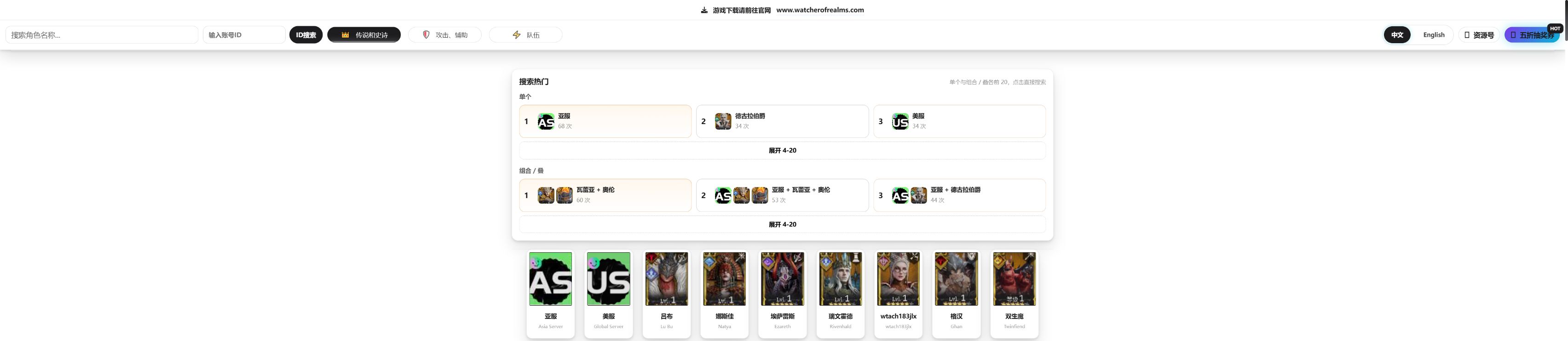
- Switch the catalog to English. Tap English near the top. Some controls remain in Chinese; use the translations below.
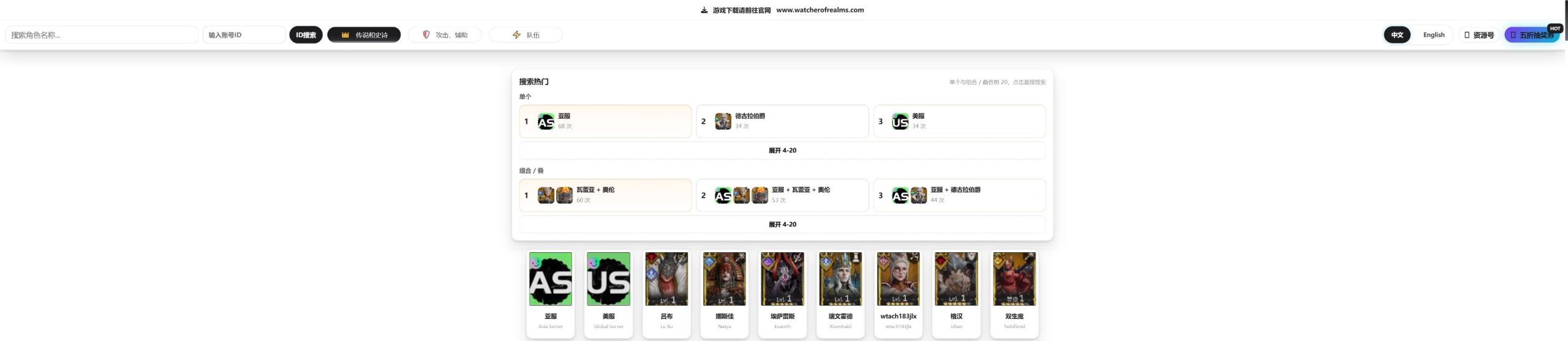
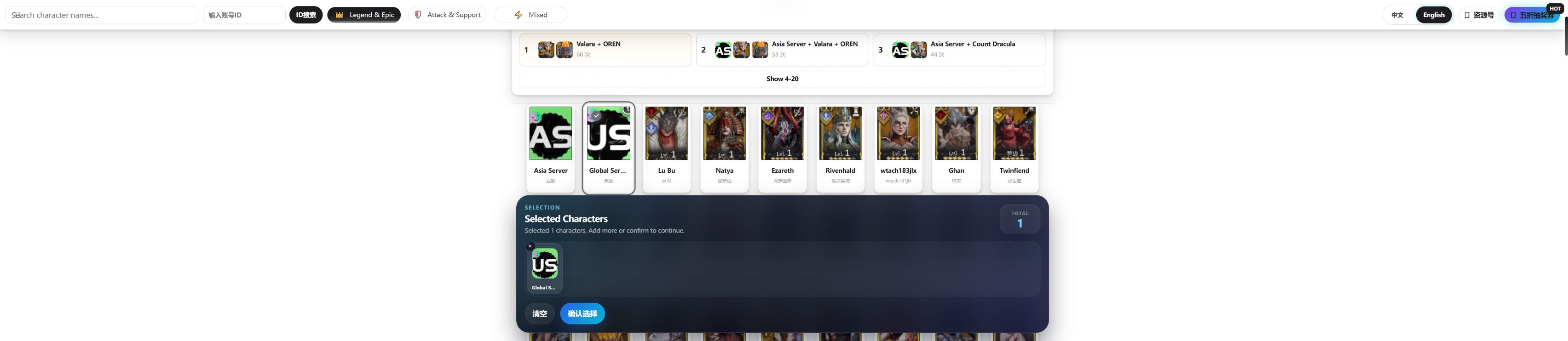
Step 1 — switch the catalog to English. Click the image to enlarge. Screenshots show an example search; availability and account details may change. - Select one version. Tap the Global Server card for Global/US (US / 美服), or Asia Server for Asia (AS / 亚服). These are server cards in the same grid as the heroes. Choose the version matching your game app.
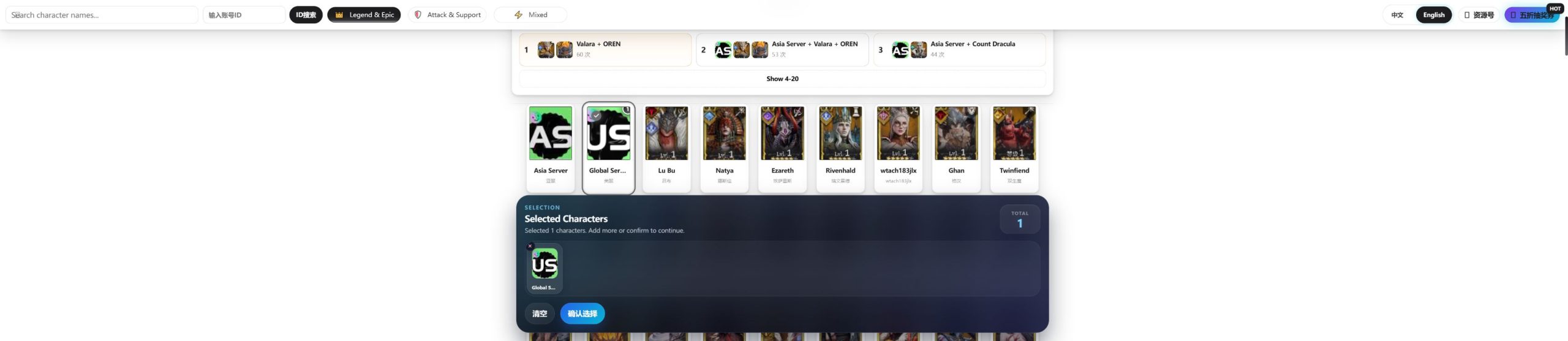
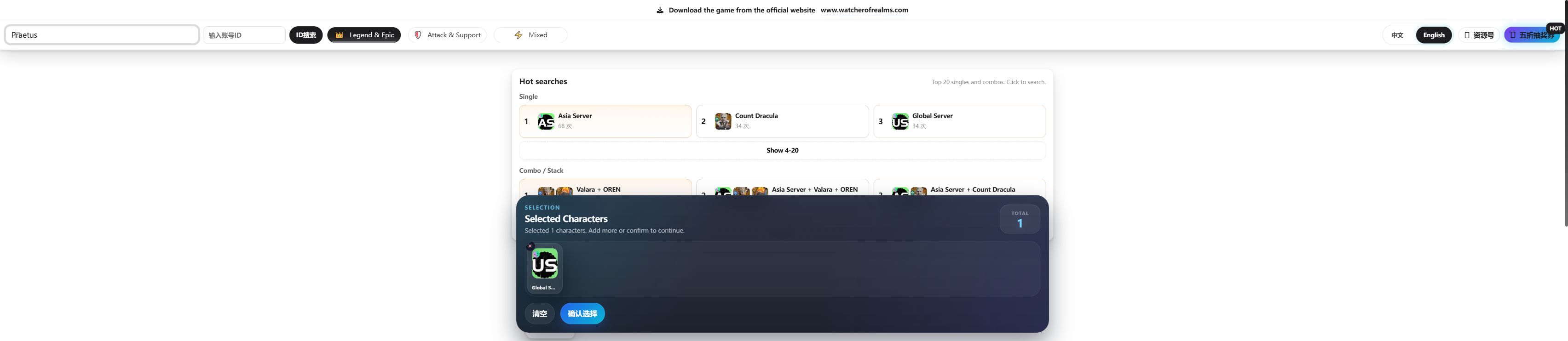
Step 2 — select Global Server or Asia Server. Click the image to enlarge. Screenshots show an example search; availability and account details may change. - Select the heroes you want. Tap their cards, or type an English hero name in Search character names… to find it. Your server and heroes appear under Selected Characters. For example, Global Server + Praetus searches that combination. The selection total also counts the server card.
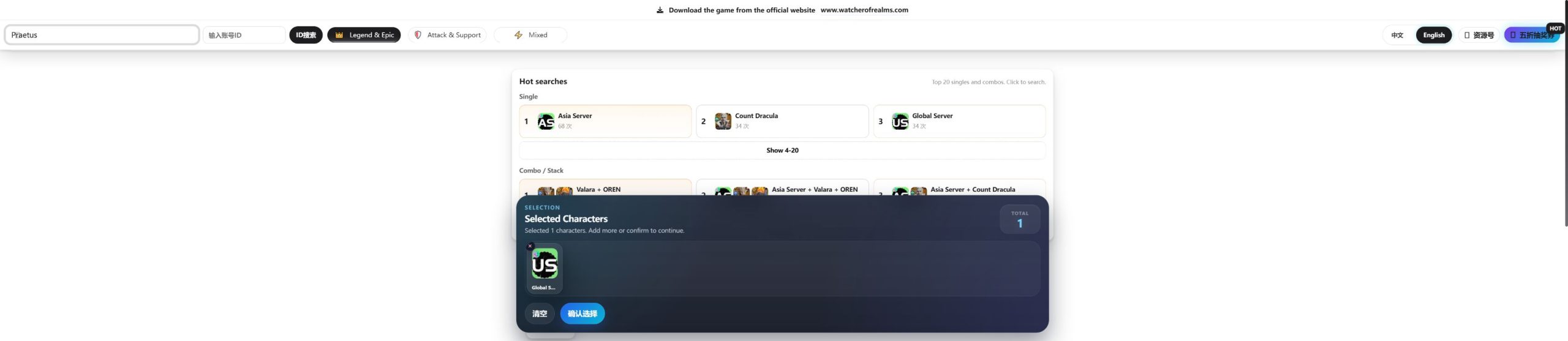
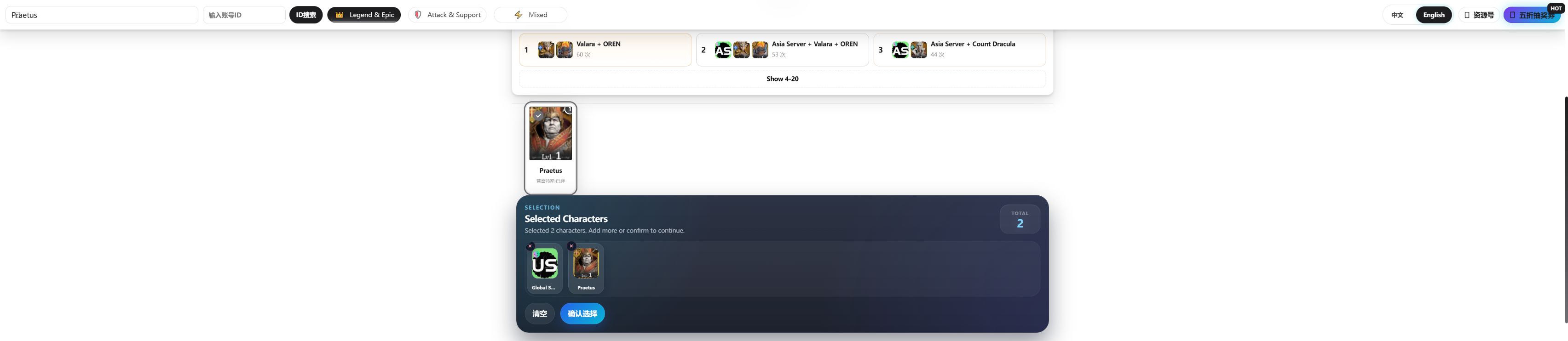
Step 3 — search for a hero by name. Click the image to enlarge. Screenshots show an example search; availability and account details may change. - Review the selection panel. Remove an unwanted selection with its × control, or use 清空 (Clear) to start again. Select fewer heroes if you cannot find a suitable account.
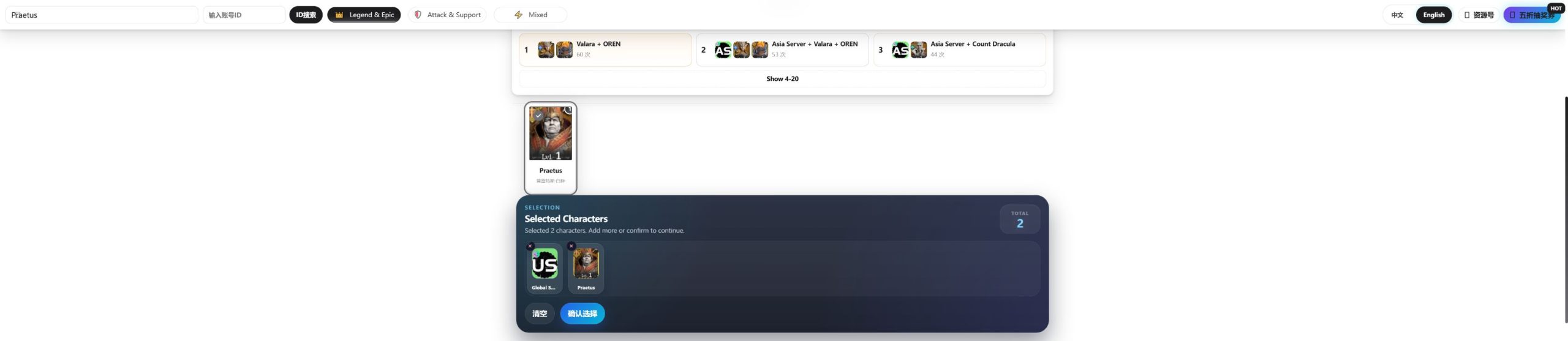
Step 4 — review the selected server and hero. Click the image to enlarge. Screenshots show an example search; availability and account details may change. - Run the search. Tap 确认选择 (Confirm Selection) at the bottom. The results page shows the chosen filters, matching accounts and page navigation.

Step 5 — open the matching account results. Click the image to enlarge. Screenshots show an example search; availability and account details may change. - Compare accounts. Check Owned Characters, the account ID, resources and Server. On Global/US results, the 500xx / 600xx / 700xx filters narrow the server group. These are different from choosing Global versus Asia. Use the page numbers or Go to → Go to see more results.
- Copy the exact account ID. Tap Copy ID on the account you want. Save a screenshot and the full catalog/result URL too. To locate a known ID from the main catalog, paste it into the account ID field and tap ID搜索 (ID Search).

Step 6 — copy the account ID. Click the image to enlarge. Screenshots show an example search; availability and account details may change. - Send the selection to Alifice. Include the server, account ID, catalog URL and screenshot. Confirm the final price


Optional: Russian results interface
The selection screen uses English. On the results page, a Русский link also lets you switch the result labels to Russian. English-speaking buyers can keep English selected.

Chinese controls explained
| Catalog text | What it means |
|---|---|
| 美服 / US | Global / US version |
| 亚服 / AS | Asia version |
| 确认选择 | Confirm Selection — show matching accounts |
| 清空 | Clear all selections |
| ID搜索 | Search for a specific account ID |
| 资源号 | Resource accounts |
| 复制ID | Copy account ID |
| 暂无图片 | No image available — use the hero name to identify the card |
Resource account catalog: illustrated guide
Open Resource Account Catalog ↗
1. Choose your region
Select Asian Server Resources / 亚服资源号 for Asia, or US Server Resources / 美服资源号 for Global/US. Tap 立即查看 (View Now).

2. Compare resources and save the account ID
Tap English. Use Sort By to change the sorting, or Keyword search to search the list. Each listing starts with ID:; the 复制 button means Copy. Save the ID, a screenshot and the catalog link, then send them to Alifice.

How to Buy an Account
- Choose your account and contact me on Discord. Follow the catalog guide, then save the account ID, a screenshot and the catalog URL. Send them to me using the short message below.
- I’ll check availability and give you a quote. I’ll use the details you send to check whether the account is still available. If it is, I’ll tell you the price.
- Accept the quote and I’ll guide you through payment. Some games allow negotiation. If the price doesn’t suit you, share your budget and offer — I’ll consider it.
- Receive your account after payment. I’ll send the account as soon as possible. If it needs email binding or a special delivery process, I’ll guide you through it.
Discord username: alificegame
Legacy username: alifice#6981
Discord user ID: 965137083515666472
Open my profile to add me. You can also use Discord’s Add Friend screen and enter alificegame.
Copy this message
Hi Alifice, I would like this account.
Game version/server: Global or Asia etc.
Catalog URL:
Account ID:
Screenshot:
My country:
Preferred payment method:
Supported Payment Methods
International payments and local wallets. Contact Alifice to confirm the options available for your country.
 PayPal
 Wise
 Skrill
 Binance
 Alipay+
 WeChat Pay
 ShopeePay
 PayNowSingapore
 GCashPhilippines
 Touch 'n GoMalaysia
 NAVER PaySouth Korea
 Kakao PaySouth Korea
 TrueMoneyThailand
 MoMoVietnam
 DANAIndonesia
Payment is arranged after your quote is confirmed. For cryptocurrency, confirm the asset, network and total amount with Alifice before sending.


Only have a credit card? I can help.
There is no direct credit card checkout on this website, but that does not mean you cannot pay by card. If you only have a credit card, contact me and I will guide you through an available payment option.
Don’t use any of the payment methods above? Tell me your country. I’ll help you find a suitable way to pay. For example, I can create an order on a third-party marketplace such as G2G, where available, so you can use one of its supported payment methods. These platforms offer a wider choice of payment options across many countries.
Card logos illustrate possible third-party options, not direct card acceptance on this website. Availability, card acceptance, fees and the final total depend on your country and the selected platform, and will be confirmed before payment.
Delivery Time
Guest accounts that need binding, or accounts with a special setup process, may take a little longer.
You may need to wait longer during busy periods, but delivery will not exceed 24 hours.
Working hours: 8:00 AM–midnight (08:00–24:00), UTC+8.
If I don’t reply immediately, I may be sleeping or busy. Leave your account details and I’ll reply as soon as I can.
Why Customers Trust Alifice
Buyers have praised my fast delivery, helpful communication and patience. Read selected customer feedback on the Reviews page, with links to the original reviews, or browse my full EpicNPC feedback history.
EpicNPC statistics last checked November 4, 2026. This is a dated snapshot; visit EpicNPC for the latest figures.
Read Customer Reviews →