Arknights · Global and Japan
Arknights Starter Accounts
Compare early-story guest accounts and accounts with more story progress. Choose your server, find a roster you like, then save the listing ID, a screenshot and the catalog link for a quote.
How to search the Arknights catalogs
Check more than one catalog for your server. Each catalog has a different selection of accounts. If you don’t find the lineup you want, try another catalog that supports the same server.
The screenshots show the Global catalogs. Follow the same steps on the corresponding Japan page. Tap a screenshot to open it at full size.
Catalog 1 · Global and Japan
Early-story guest accounts
Global listings are around stages 0-1 or 0-11. Alifice will guide you through linking the guest account to your email for Yostar login.
Open Catalog 1 · Global ↗Open Catalog 1 · Japan ↗
- Select your Operators. Open the 6 Star or 5 Star tab and tap the portraits you want. A checked card is selected.
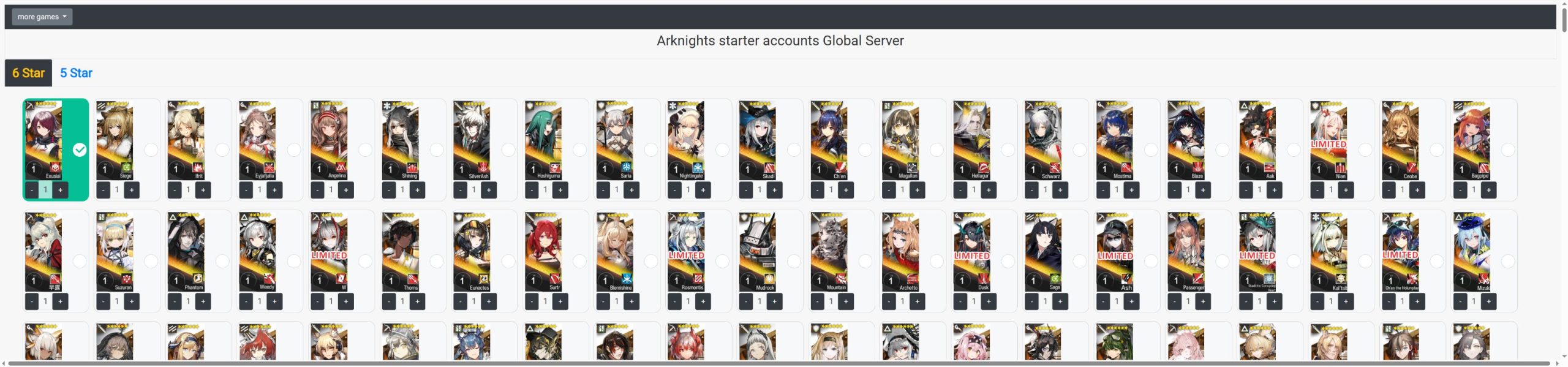
Step 1. Choose the rarity tab and tap the Operator portrait. - Search below the portraits. Scroll to the bottom of the Operator grid and press 搜索 (Search). If you already have a listing ID, enter it in Search ID before searching.
- Save the listing ID. Find the row you want and copy the code in the left 序号 (ID) column. The Global examples begin with AKEN. Save a screenshot of the row with the roster visible.
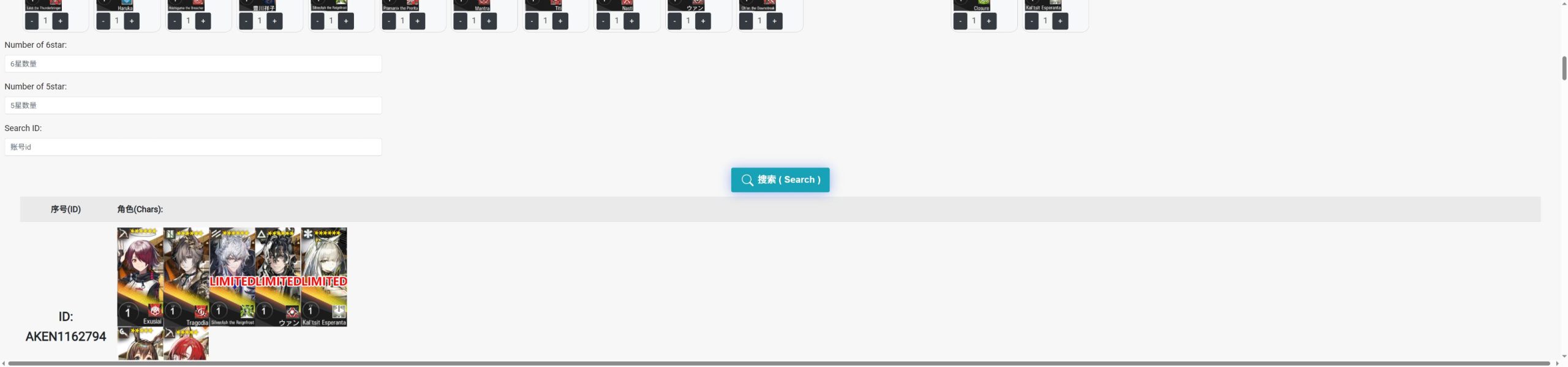
Steps 2–3. Press Search, then copy the ID beside the matching roster.
Catalog 2 · Global and Japan
Accounts with story progress
Global listings are around stage 2-9 and come with a linked email that you can change after delivery.
Open Catalog 2 · Global ↗Open Catalog 2 · Japan ↗
- Choose six-star Operators. Under 六星角色 (6-star Operators), tap the portraits you want. A green check marks a selected portrait.

Step 1. Look for the green check on a selected Operator. - Run the search. Return to the top and tap 搜索 (Search). Tap 清除 (Clear) to reset the filters. To look up a known listing, enter its ID in 搜索编号id and search.

Step 2. Tap 搜索 at the top to load matching accounts. - Read the result and save its ID. Scroll past the Operator grid to the results table. Copy the number under 编号 (Listing ID). The 内容 (Details) column contains the account data. Tap 查看图片 (View images) for the listing images, and save the ID, screenshot and catalog link for your quote.

Step 3. Copy the number in the left column. The longer data string is in the Details column.
How to read the account data
Example from Catalog 2
33----166620----110----main_02----9----721----4----0----6|烛煌|余|莱伊|斩业星熊|佩佩|遥
- 33
- Account level (LV)
- 166620
- Remaining Synthetic Jade (Orundum)
- 110
- Originite Prime
- main_02 · 9
- Main story progress, stage 2-9
- 721
- Random number in the catalog data
- 4
- Headhunting tickets
- 0
- Additional catalog field
- 6 | names
- Six Operators, followed by their names
Use the separate 编号 (Listing ID) when requesting a quote.
How to Buy an Account
- Choose your account and contact me on Discord. Follow the catalog guide, then save the account ID, a screenshot and the catalog URL. Send them to me using the short message below.
- I’ll check availability and give you a quote. I’ll use the details you send to check whether the account is still available. If it is, I’ll tell you the price.
- Accept the quote and I’ll guide you through payment. Some games allow negotiation. If the price doesn’t suit you, share your budget and offer — I’ll consider it.
- Receive your account after payment. I’ll send the account as soon as possible. If it needs email binding or a special delivery process, I’ll guide you through it.
Discord username: alificegame
Legacy username: alifice#6981
Discord user ID: 965137083515666472
Discord Group: discord.gg/uUcxYudv8W
Email: support@alifice.com
Open my profile to add me. You can also use Discord’s Add Friend screen and enter alificegame.
Copy this message
Hi Alifice, I would like this account.
Game version/server: Global or Asia etc.
Catalog URL:
Account ID:
Screenshot:
My country:
Preferred payment method:
Supported Payment Methods
International payments and local wallets. Contact Alifice to confirm the options available for your country.
 PayPal
 Wise
 Skrill
 Binance
 Alipay+
 WeChat Pay
 ShopeePay
 PayNowSingapore
 GCashPhilippines
 Touch 'n GoMalaysia
 NAVER PaySouth Korea
 Kakao PaySouth Korea
 TrueMoneyThailand
 MoMoVietnam
 DANAIndonesia
Payment is arranged after your quote is confirmed. For cryptocurrency, confirm the asset, network and total amount with Alifice before sending.


Only have a credit card? I can help.
There is no direct credit card checkout on this website, but that does not mean you cannot pay by card. If you only have a credit card, contact me and I will guide you through an available payment option.
Don’t use any of the payment methods above? Tell me your country. I’ll help you find a suitable way to pay. For example, I can create an order on a third-party marketplace such as G2G, where available, so you can use one of its supported payment methods. These platforms offer a wider choice of payment options across many countries.
Card logos illustrate possible third-party options, not direct card acceptance on this website. Availability, card acceptance, fees and the final total depend on your country and the selected platform, and will be confirmed before payment.
Delivery Time
Guest accounts that need binding, or accounts with a special setup process, may take a little longer.
You may need to wait longer during busy periods, but delivery will not exceed 24 hours.
Working hours: 8:00 AM–midnight (08:00–24:00), UTC+8.
If I don’t reply immediately, I may be sleeping or busy. Leave your account details and I’ll reply as soon as I can.
Why Customers Trust Alifice
Buyers have praised my fast delivery, helpful communication and patience. Read selected customer feedback on the Reviews page, with links to the original reviews, or browse my full EpicNPC feedback history.
EpicNPC statistics last checked November 4, 2026. This is a dated snapshot; visit EpicNPC for the latest figures.
Read Customer Reviews →